
Example: Christmas scoreboard (2)
This board adds a staged intro. The lines are revealed over time with <single> and <delay>, then the normal animation starts. The screenshot is an animated capture of the board in game.
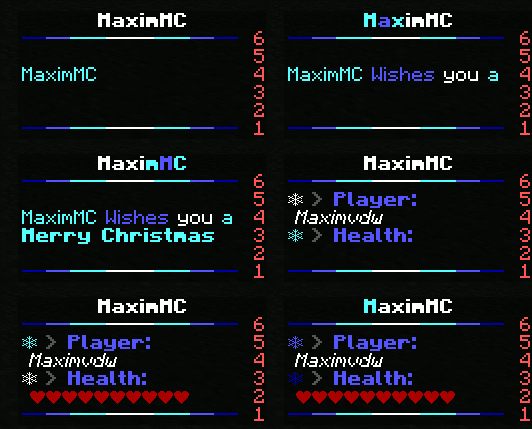
yaml
title:
  frames:
    - '<glow repeatfirstframe="10" startglowcolor="&b&l" glowcolor="&9&l" endglowcolor="&b&l" normalcolor="&f&l">MaximMC</glow>'
  interval: 3
  random: false

lines:
  header:
    frames:
      # Long enough to keep the board width stable while text animates.
      - '&1&m--&9&m--&b&m---&f&m----&b&m---&9&m--&1&m--'
    interval: 100
    random: false

  label-player:
    frames:
      # This frame runs only once at the start of the board.
      # Calculation: 15 frames × 4 ticks = 60 ticks.
      - '<delay times="15"><single></single></delay>'
      - '&f❄ &8&l> &9&lPlayer:'
      - '&b❄ &8&l> &9&lPlayer:'
      - '&9❄ &8&l> &9&lPlayer:'
      - '&1❄ &8&l> &9&lPlayer:'
      - '&9❄ &8&l> &9&lPlayer:'
      - '&b❄ &8&l> &9&lPlayer:'
    interval: 4
    random: false

  player:
    frames:
      # Typewriter intro, then the normal player name.
      # Calculation: 10 + 10 + 10 + 10 + (2 × 10) ticks = 60 ticks.
      - '<single></single>'
      - '<single>&bMaximMC</single>'
      - '<single>&bMaximMC &9Wishes</single>'
      - '<single>&bMaximMC &9Wishes &fyou</single>'
      - '<single><delay times="2">&bMaximMC &9Wishes &fyou &ba</delay></single>'
      - ' &o%player_name%'
    interval: 10
    random: false

  label-health:
    frames:
      # Calculation: (10 + 5) × 4 ticks = 60 ticks.
      - '<delay times="10"><single></single></delay>'
      - '<single><delay times="5">&b&l<translate from="en" to="nl">Merry Christmas</translate></delay></single>'
      - '&b❄ &8&l> &9&lHealth:'
      - '&9❄ &8&l> &9&lHealth:'
      - '&1❄ &8&l> &9&lHealth:'
      - '&9❄ &8&l> &9&lHealth:'
      - '&b❄ &8&l> &9&lHealth:'
      - '&f❄ &8&l> &9&lHealth:'
    interval: 4
    random: false

  health:
    frames:
      # 60 frames × 1 tick = 60 ticks.
      - '<delay times="60"><single></single></delay>'
      - ' &c%healthbar_default%'
    interval: 1
    random: false

  footer:
    frames:
      - '&1&m--&9&m--&b&m---&f&m----&b&m---&9&m--&1&m--'
    interval: 100
    random: false
What it demonstrates
| Technique | Effect |
|---|---|
<single> | A frame that runs once, then is removed from the loop. |
<delay times="..."> | Holds a frame for a number of animation steps. |
| Staged timings | Each line spends about 60 ticks on its intro before the loop starts. |
<glow> | A moving highlight across the title. |
<translate> | A greeting in the client's language (fixed to Dutch here). |
About the timing
The intro calculations assume an interval of 4 ticks (0.2 seconds) for the label lines and 1 tick for the health line. The goal is to make every intro finish at roughly the same time, so the board settles into its normal animation together. If you change an interval, adjust the delay times values to match.
Simpler intros
Modern clients render animations smoothly even without a staged intro. If the timing becomes hard to maintain, use <single> on a few title frames and keep the rest of the board static.